Overview
In late 2025, cybersecurity researchers and government agencies worldwide have issued urgent warnings about a surge in WhatsApp account hijacking attacks. The most prominent of these, dubbed GhostPairing, exploits WhatsApp's legitimate device-linking feature to give attackers complete access to victims' accounts—without requiring passwords, OTPs, or SIM swaps.
This article examines the technical details of these attacks, the official government advisories issued in response, and the concrete steps users can take to protect themselves.
The GhostPairing Attack
In December 2025, Gen Digital's security research team uncovered a sophisticated social engineering campaign targeting WhatsApp users. The campaign was first observed in Czechia but has since spread globally, with compromised accounts serving as springboards to reach new victims.
What makes GhostPairing particularly dangerous is its exploitation of WhatsApp's own security infrastructure. Rather than breaking encryption or exploiting software vulnerabilities, attackers trick users into completing WhatsApp's legitimate device-pairing process—effectively inviting the attacker into their account.
How the Attack Works
Stage 1: Initial Contact
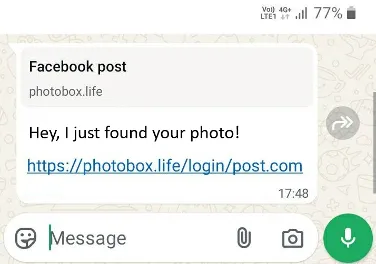
Victims receive a message from a trusted contact—someone already in their WhatsApp contacts list whose account has been compromised. The message typically reads something like: "Hey, I just found your photo!" accompanied by a link displaying a Facebook-style preview.
Stage 2: The Fake Verification Page
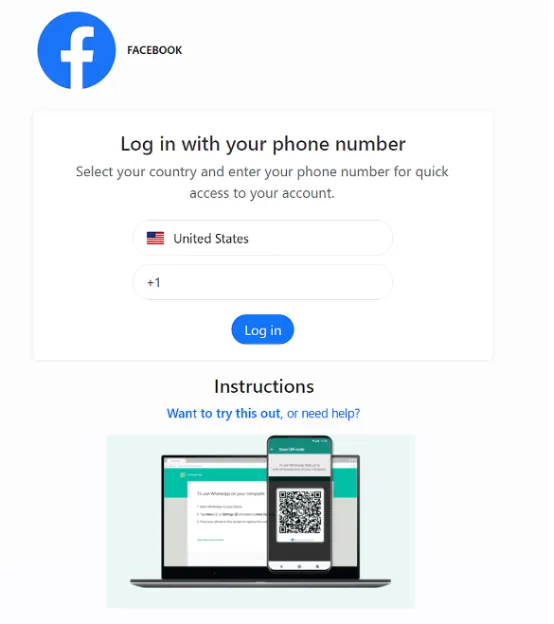
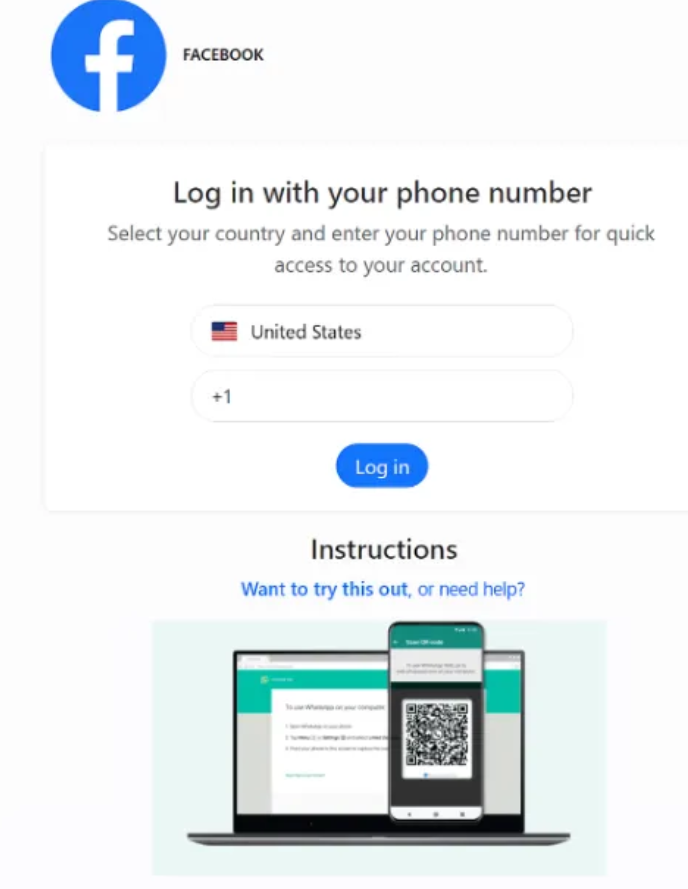
Clicking the link redirects victims to convincing lookalike domains such as photobox.life or yourphoto.world. These pages mimic Facebook login interfaces, prompting users to "verify" their identity to view the supposed photo.
Stage 3: Device Linking Exploitation
The attack leverages WhatsApp's two legitimate pairing methods:
| Method | Description | Usage in Attacks |
|---|---|---|
| QR Code | Scan with WhatsApp camera | Less common—requires scanning on same device |
| Numeric Code | Enter 6-digit code in WhatsApp | Primary attack vector—victims believe it's routine verification |
When victims enter their phone number on the fake page, the attacker's infrastructure forwards this to WhatsApp's legitimate device-linking endpoint. WhatsApp generates a pairing code, which the attacker displays to the victim.
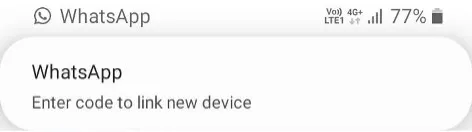
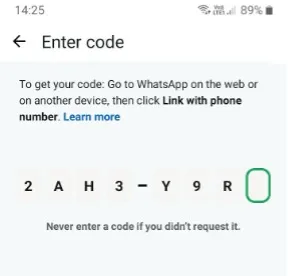
Stage 4: Account Compromise
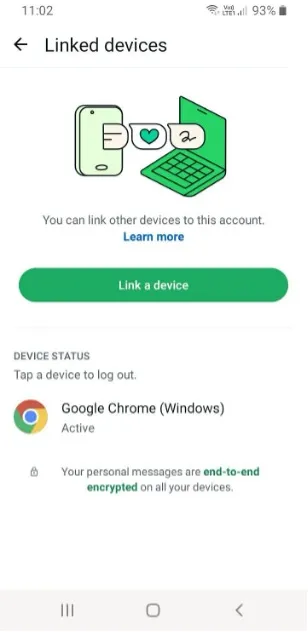
By entering this code, victims unknowingly link the attacker's browser as a trusted device. The attacker now has WhatsApp Web-equivalent access to the account.
Attacker Capabilities
Once linked, attackers gain extensive access:
-
Message Access: Read all historical and incoming messages in real-time
-
Media Access: View and download all photos, videos, and voice notes
-
Impersonation: Send messages as the victim to individuals and groups
-
Data Harvesting: Collect sensitive information including addresses, email addresses, verification codes, and financial details
-
Propagation: Send the same malicious link to the victim's contacts, spreading the attack further
Critically, many victims remain unaware that a second device has been linked, enabling prolonged surveillance and data collection.
The Malicious npm Package: lotusbail
In December 2025, researchers at Koi Security disclosed a parallel threat targeting developers. A malicious package named lotusbail had been uploaded to the npm registry by a user named seiren_primrose, masquerading as a legitimate WhatsApp API tool.
The package accumulated over 56,000 downloads between its initial upload in May 2025 and its discovery in December.
| Data Type | Collection Method |
|---|---|
| Authentication tokens | Captured during login |
| Session keys | Extracted from WebSocket handshake |
| Message history | Intercepted via socket wrapper |
| Contact lists | Harvested with phone numbers |
| Media files | Documents and images exfiltrated |
Obfuscation Techniques
The malware employs four layers of obfuscation before exfiltrating data:
-
Unicode Manipulation: Transforms data using Unicode encoding tricks
-
LZString Compression: Compresses payload to reduce detection signatures
-
Base-91 Encoding: Non-standard encoding to evade pattern matching
-
AES Encryption: Final encryption layer using custom RSA implementation
The most insidious aspect: the malware embedded a hardcoded, AES-encrypted pairing code that silently linked the threat actor's device to the victim's WhatsApp account. This provided persistent backdoor access that remained active even after uninstalling the malicious package.
Zero-Click Exploit Chains
iOS/WhatsApp Exploit Chain
In August 2025, security researchers identified a sophisticated zero-click attack chain targeting Apple device users through WhatsApp.
| CVE | Type | Impact |
|---|---|---|
| CVE-2025-55177 | WhatsApp - Incomplete authorization of linked device sync | Remote URL processing without user interaction |
| CVE-2025-43300 | Apple - Out-of-bounds write in ImageIO | Memory corruption, arbitrary code execution |
The campaign targeted fewer than 200 high-value individuals worldwide, including journalists, activists, and government officials.
LANDFALL Spyware Campaign
Unit 42 researchers at Palo Alto Networks identified a 9-month campaign deploying Android spyware dubbed LANDFALL against Samsung Galaxy devices in the Middle East.
| Attribute | Value |
|---|---|
| CVE | CVE-2025-21042 |
| Severity | Critical |
| Type | Out-of-bounds write in libimagecodec.quram.so |
| Delivery | WhatsApp messages containing malicious DNG images |
| Targets | Samsung Galaxy S22, S23, S24, Z Fold 4, Z Flip 4 |
| Geographic Focus | Iraq, Iran, Turkey, Morocco |
This was a Samsung vulnerability, not a WhatsApp exploit. WhatsApp served only as the delivery mechanism—the exploitation occurred in Samsung's media framework when it automatically processed the image.
Government Advisories
CISA Alert (November 24, 2025)
The Cybersecurity and Infrastructure Security Agency (CISA) issued an official alert warning of active spyware campaigns targeting messaging application users.
| Campaign | Target | Method |
|---|---|---|
| Signal Device-Linking Abuse | Signal users | Russian groups (Sandworm, Turla) via malicious QR codes |
| LANDFALL | Samsung users | Zero-click via CVE-2025-21042 |
| iOS/WhatsApp Chain | Apple users | Zero-click chaining CVE-2025-55177 + CVE-2025-43300 |
| ProSpy/ToSpy | General users | Malicious apps impersonating Signal, TikTok |
CERT-In Advisory (December 19, 2025)
India's Computer Emergency Response Team issued a high-severity warning specifically addressing the GhostPairing vulnerability:
"It has been reported that malicious actors are exploiting WhatsApp's device-linking feature to hijack accounts using pairing codes without authentication requirement."
Singapore Police Force Advisory (November 12, 2025)
The Singapore Police Force issued an advisory on a new variant of WhatsApp account takeover scams.
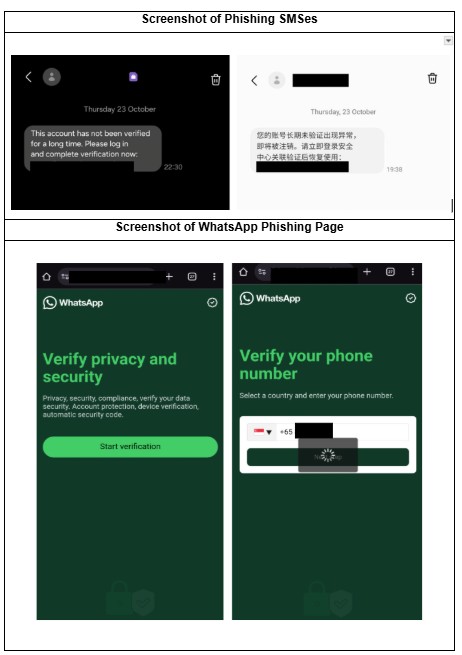
The ADD-CHECK-TELL Framework:
| Action | Steps |
|---|---|
| ADD | Install ScamShield app; Enable Two-Step Verification |
| CHECK | Verify link authenticity; Call contacts directly; Review linked devices |
| TELL | Report to police and bank; Contact ScamShield Helpline (1799) |
Why These Attacks Work
These attacks succeed because they exploit multiple layers of trust:
| Trust Layer | Exploitation Method |
|---|---|
| Contact Trust | Messages come from known contacts, bypassing suspicion |
| Platform Trust | Users trust WhatsApp's device-linking mechanism |
| Interface Trust | Fake pages replicate familiar platforms |
| Process Trust | Entering codes feels like routine verification |
Protection Measures
Immediate Actions:
-
Enable Two-Step Verification: Navigate to Settings → Account → Two-Step Verification
-
Audit Linked Devices: Go to Settings → Linked Devices and remove unrecognized sessions
-
Be skeptical of "Found Your Photo" messages, even from known contacts
Ongoing Practices:
-
Never enter verification codes from external sites—WhatsApp will never ask for this
-
Verify unusual requests by calling contacts directly (not through WhatsApp)
-
Keep apps and devices updated to latest versions
Minimum Safe Versions:
| Platform | Version |
|---|---|
| WhatsApp for iOS | v2.25.21.73 |
| WhatsApp Business for iOS | v2.25.21.78 |
| WhatsApp for Mac | v2.25.21.78 |
| Samsung devices | April 2025 security patch |
If You've Been Compromised:
-
Immediately log out all sessions from Settings → Linked Devices
-
Enable Two-Step Verification
-
Notify your contacts that your account was compromised
-
Report the incident to local authorities and WhatsApp
-
If notified of a zero-click attack, perform a full device factory reset
Timeline of Events
| Date | Event |
|---|---|
| July 2024 | LANDFALL spyware campaign begins targeting Middle East |
| April 2025 | Samsung patches CVE-2025-21042 |
| May 2025 | Malicious lotusbail package uploaded to npm |
| August 2025 | CVE-2025-55177 and CVE-2025-43300 exploited |
| September 2, 2025 | CISA adds CVE-2025-55177 to KEV catalog |
| November 10, 2025 | CISA adds CVE-2025-21042 to KEV catalog |
| November 12, 2025 | Singapore Police Force issues advisory |
| November 24, 2025 | CISA issues messaging app spyware alert |
| December 19, 2025 | CERT-In issues GhostPairing warning |
| December 2025 | Gen Digital and Koi Security publish research |
Conclusion
The GhostPairing campaign and related WhatsApp hijacking attacks of 2025 represent a significant evolution in account takeover techniques. By exploiting legitimate platform features through social engineering, attackers have found methods that bypass traditional security measures entirely.
The response from government agencies worldwide—including CISA, CERT-In, Singapore Police Force, and others—underscores the severity of this threat. Their unified message is clear: users must remain vigilant, enable available security features, and treat unexpected messages with healthy skepticism.
These attacks demonstrate that sophisticated encryption and security features can be circumvented entirely through social engineering. The attack never "breaks" WhatsApp's security—it tricks users into opening the door themselves.